
Calls & Variables
Two rules explain most of what a fiz recipe draws:
- A call creates a node.
- A variable creates an edge into whatever call uses it.
Assignments do not draw anything. They give names to nodes so that subsequent calls can draw edges from them.
Calls
A call is the fundamental building block of a fiz recipe. Each one creates exactly one node in the DAG.
f()

Above is a complete recipe: one node named f, no edges.
Arguments
An argument is a reference to an existing node such as a variable bound earlier in the recipe or a nested call. Each argument draws an edge into the call's node.
x = f()
g(x)

This creates two nodes, f and g, and one edge f → g.
WARNING
An argument is not a declaration. A bare name that nothing has bound yet is a reference error (REF_VAR_NOT_FOUND), so f(x) on its own does not compile because x has to be bound first. Order matters: a variable assigned after the call that references it is not in scope yet.
Multiple Arguments
Calls accept comma-separated arguments, each drawing its own edge:
b = get_butter()
s = get_sugar()
cream(b, s)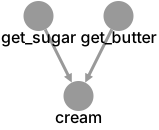
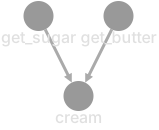
This draws get_butter → cream and get_sugar → cream.
Nested Calls
An argument can be a call which creates that node and an edge from it:
g = gather()
rinse(dry(g))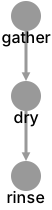

This creates gather, dry, and rinse, with edges gather → dry and dry → rinse. An edge from a nested call is unnamed, because no variable carries it.
Inline Styling
A call's style block styles the node it creates:
m = mix()
bake(m){ background-color: #cc4444 }

See Styling for full details.
Assignments
An assignment binds one or more names to the result of a call, variable, namespace, or import.
x = mix()
y = bake(x)

An assignment creates no node and no edge of its own. The name on the left becomes another way to refer to the node the right-hand side produced, so this recipe has two nodes (mix, bake) and one edge (mix → bake). The name y is simply how later statements can refer to bake's node:
x = chop()
y = fry(x)
z = stir(y)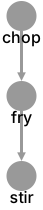

That last line adds the node stir and the edge fry → stir. The whole recipe is three nodes and two edges. There is one node per call and one edge per variable used.
Multiple Left-Hand Side Variables
An assignment can bind several names at once. All of them alias the same node:
eggs = gather()
whites, yolks = split(eggs)
whip(whites)
rest(yolks)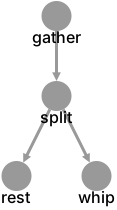
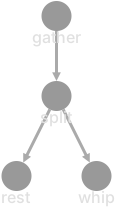
whites and yolks both name the split node, so this draws split → whip and split → rest. Repeating a name on one left-hand side is a warning (SYN_DUPLICATE_LHS_NAME).
Styling on LHS Variables
A variable's style block styles the edges that variable draws, not a node. A variable is an edge, so that is the element that receives the style:
eggs = gather()
whites{ line-color: #ff0000 }, yolks = split(eggs)
whip(whites)  // this edge is red
rest(yolks)   // this edge is not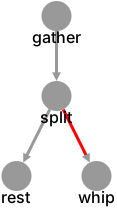
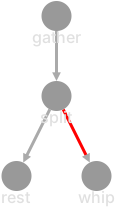
To style the node instead, put the style on the call that creates it.
Variables
Simple Variables
A variable is a name bound by an assignment. Used as an argument, it draws an edge. The edge takes the variable's name, which is what enables a name style binding target it.
Qualified Variables
Use dot notation to access variables inside namespaces and named imports:
ns.resultSee Namespaces for how scoping works.
Comments
Fiz supports two comment styles:
// Line comment — extends to the end of the line

/* Block comment —
   can span multiple lines */
Semicolons
Statements are separated by semicolons, which are automatically inserted at newlines. You can write multiple statements on one line with explicit semicolons:
dough = knead(); loaf = shape(dough); bread = bake(loaf)