
Language Syntax
Quick-reference for all fiz language constructs.
Grammar Reference
| Construct | Syntax | Example |
|---|---|---|
| Call | name(args) | f(x, y) |
| Call with style | name(args){ styles } | f(x){ color: #f00 } |
| Assignment | lhs = rhs | y = f(x) |
| Multi-assignment | a, b = rhs | a, b = split(eggs) |
| Styled LHS | name{ styles } = rhs | y{ shape: "diamond" } = f(x) |
| Bare variable | name | y |
| Qualified variable | name.name | ns.var |
| Namespace | name[ stmts ] | prep[ y = f(x) ] |
| Namespace + args | name[ stmts ](args) | prep[ y = f(x) ](flour) |
| Namespace + style | name[ stmts ]{ styles } | prep[ y = f(x) ]{ color: #eef } |
| Anonymous namespace | [ stmts ] | [ a = f(x) ] |
| Import | @ "path.fiz" | @ "./lib.fiz" |
| Named import | name @ "path.fiz" | lib @ "./lib.fiz" |
| Assigned import | lhs = name @ "path.fiz" | x = lib @ "./lib.fiz" |
| Style tag declaration | #name { styles } | #finish { border-width: 4 } |
| Style tag reference | #name | f(x){ #finish } |
| Qualified style tag | #ns.name | f(x){ #ns.finish } |
| Style binding | %keyword { styles } | %rest { color: #0a0 } |
| Global style binding | *keyword { styles } | *node { color: #eee } |
| Renderer directive | ^name { keys } | ^cytoscape{ layout: "elk" } |
| About note | ~name { keys } | ~author{ name: "Ada" } |
| Anonymous about note | ~{ keys } | ~{ "A recipe" } |
| Line comment | // text | // a comment |
| Block comment | /* text */ | /* multi-line */ |
A statement can be a call, a variable, an assignment, a style tag declaration, a style binding, a global style binding, a renderer directive, an about note, a namespace, or an import.
Top-Level-Only Statements
Two constructs describe the recipe as a whole and are rejected inside a namespace:
| Construct | Error if nested |
|---|---|
^name{ } renderer directive | SYN_RENDERER_DIRECTIVE_NOT_TOP_LEVEL |
~name{ } about note | SYN_ABOUT_NOTE_NOT_TOP_LEVEL |
See Renderers and About Notes.
Identifiers
Identifiers start with a letter or _, followed by any combination of letters, digits, or _. Unicode characters above U+00A0 are also allowed.
myVar
_private
café
🔥
Qualified Identifiers
Dot-separated identifiers for accessing namespaced variables and style tags:
namespace.variable
outer.inner.value
#ns.tagName
Note that a property name inside a style or directive block is a CSS-style identifier instead: it may contain - but never .. This is why ELK's dotted option ids are written with dashes in a renderer directive.
Semicolons
Semicolons separate statements. They are automatically inserted at newlines, so explicit semicolons are only needed for multiple statements on one line:
// These are equivalent:
dough = knead()
loaf = shape(dough)
bread = bake(loaf)

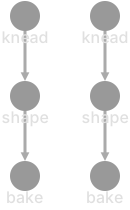
dough = knead(); loaf = shape(dough); bread = bake(loaf)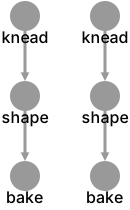
Literals
Strings
Double or single-quoted, with backslash escapes:
"hello world"
'single quotes'
"escaped \"quote\""
Numbers
Integer or decimal, with optional sign and scientific notation:
42
-3.14
1.5e10
.25
Numbers may have a unit suffix (e.g., px, em):
12px
2.5em
Colors
Hex color literals prefixed with #:
#ff0000      // 6-digit
#4488cc      // 6-digit
#abc         // 3-digit (shorthand)
#ff000080    // 8-digit (with alpha)
Style Declarations
Inside any style block ({ }), properties use property: value syntax:
{
  background-color: #4488cc
  border-width: 3
  label: "My Node"
}
A value is a string, number, or color literal. Bare words are not values, so keyword-valued properties must be quoted:
{ shape: "diamond" }      // correct
{ shape: diamond }        // parse error
Multiple values for a single property are comma-separated:
{
  background-gradient-stop-colors: #ff0000, #0000ff
}
A bare string literal in a block is shorthand for the description property, and several lines in a single block get joined with newlines:
x = cut()
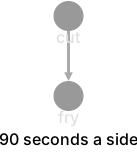
fry(x){ "90 seconds a side" }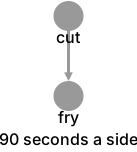
Semicolons Inside a Style Block
A style block holds three kinds of entry: declarations, #tag references, and bare strings. Only a declaration may be followed by a semicolon. A semicolon after a tag or a string is a parse error.
{ #tag prop: 1 }        // correct
{ prop: 1; #tag }       // correct
{ #tag; prop: 1 }       // parse error
{ "desc"; prop: 1 }     // parse error
{ "desc" prop: 1 }      // correct
Newlines separate entries as well, so a multi-line block does not need semicolons.
The same block syntax is reused by style tag declarations, style bindings, global style bindings, renderer directives, and about notes. All of them accept #tag references alongside their own declarations.