
Renderers
Formulavize draws a compiled DAG through a renderer. A recipe picks which renderer draws it, and configures it, with a renderer directive.
Selecting a Renderer
A renderer directive is ^ followed by the renderer's name and a block:
^cytoscape{ }The app ships with two renderers:
| Name | Display name | Draws | Export formats |
|---|---|---|---|
cytoscape | Cytoscape Renderer | Interactive graph (default) | png, jpg, svg |
minimal | Minimal Example Renderer | Plain-text DAG summary | txt |
A recipe that declares no directive gets cytoscape by default.
The minimal renderer exists as the worked example for writing a renderer. It is useful for seeing the compiled DAG summarized in text:
^minimal{ }

x = f()
y = g(x)
Resolution Rules
- Last declared wins. If a recipe names several registered renderers, the last directive decides.
- Unknown names are skipped. The compiler does not validate a renderer name against the known renderers. For example,
^nosuchrenderer{ }gets ignored - it does not error, and it does not stop an earlier directive from being used. - Absent falls back. Selecting no valid renderers uses the default.
Top Level Only
A renderer directive applies to the whole drawing, so it is only allowed at the top level of a recipe. One inside a namespace is an error (SYN_RENDERER_DIRECTIVE_NOT_TOP_LEVEL) and is ignored:
ns[
  ^cytoscape{ layout: "elk" }   // error: not at top level
]
Writing Directive Values
A directive block uses the same key: value syntax as a style block, so values must be string, number, or color literals. Enumerated values are strings and need quotes:
^cytoscape{
  layout: "elk"          // string — quoted
  padding: 30            // number — bare
  background-color: #1e1e1e   // color literal
}
Directive blocks also accept style tags, which resolve exactly as they do in a style binding: tags apply in declaration order, and inline properties win over all of them.
#darkCanvas { background-color: #1e1e1e }

^cytoscape{ #darkCanvas layout: "elk" }
Note that a semicolon may only follow a declaration, never a style tag — write { #darkCanvas layout: "elk" }, not { #darkCanvas; layout: … }.
Directives Are Never Validated
Directive keys and values are read by the renderer, not the compiler. Nothing here is checked at compile time, which means:
- A key the renderer does not know is ignored.
- A value that fails to parse is dropped, so the renderer's own default applies.
- An unrecognized
layoutname silently falls back todagrein the Cytoscape renderer.
A typo in a directive changes nothing rather than breaking the recipe. If a directive seems to have no effect, check the spelling against Renderer Directives.
The Cytoscape Canvas
background-color fills the drawing surface in the editor view and in exported images:
^cytoscape{ background-color: #f7f7fb }This is a renderer directive rather than a style property because it paints the canvas, not any node or edge.
Layouts
layout selects how nodes are positioned:
^cytoscape{ layout: "dagre" }| Layout | Positions nodes | Notes |
|---|---|---|
dagre | Automatically (default) | Hierarchical; loosely follows insertion order |
breadthfirst | Automatically | Built into Cytoscape; ignores namespaces |
elk | Automatically | Eclipse Layout Kernel; best model-order preservation |
manual | You do, by dragging | Turns the layout manager off |
Each layout takes its own options, named as that layout's own documentation names them. See Renderer Directives for the complete per-layout option tables.
The three automatic layouts below are shown with the same four-node recipe, so the figures differ only by the layout and its options.
dagre
The default. Hierarchical, with a sort hint that loosely preserves the order statements appear in the recipe.
^cytoscape{
  layout: "dagre"
  rankDir: "LR"
  rankSep: 80
}

t = fetch()
p = purée(t)
d = dice(t)
r = combine(p, d)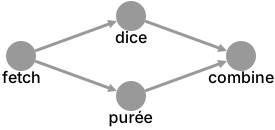
breadthfirst
Cytoscape's built-in breadthfirst layout.
^cytoscape{
  layout: "breadthfirst"
  direction: "rightward"
  spacingFactor: 2.5
}

t = fetch()
p = purée(t)
d = dice(t)
r = combine(p, d)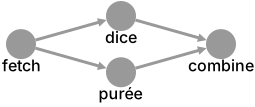
WARNING
breadthfirst ignores compound parents. A recipe that uses namespaces will draw their children on top of the namespace box rather than inside it.
elk
The Eclipse Layout Kernel, via cytoscape-elk. ELK option ids are dotted, but a fiz property name cannot contain ., so they are written with dashes (elk-layered-spacing-nodeNodeBetweenLayers) and rewritten on the way out.
^cytoscape{
  layout: "elk"
  elk-algorithm: "layered"
  elk-direction: "RIGHT"
  elk-spacing-nodeNode: 40
}

t = fetch()
p = purée(t)
d = dice(t)
r = combine(p, d)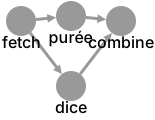
Any elk-* key not in the documented list is passed straight through with the same dash-to-dot rewriting, which keeps the whole ELK option namespace reachable. Such keys are unvalidated by design; ELK ignores ids it does not know.
manual
manual is not a layout algorithm - it hands node placement to you. Nodes stay draggable, and their arrangement is carried across recipe edits rather than recomputed.
^cytoscape{ layout: "manual" }

t = fetch()
p = purée(t)
d = dice(t)
r = combine(p, d)
The viewport is deliberately not refitted on every edit, so changing the recipe does not fight you for control of the view.
Rendering Outside the Browser
A renderer that can also draw without a browser exposes a headless export, which the CLI uses. Both cytoscape and minimal can, and the CLI honors the same ^<name>{ } directive the app does.